# AI dubbing for YouTube: how to auto dub in your voice
> What AI dubbing is, how to auto dub a YouTube video into other languages in your own voice, how long it takes and what it costs.
Guide · Published 2026-11-08
Canonical page: https://dubtitle.com/guides/ai-dubbing-for-youtube/
AI dubbing turns the speech in a video into a spoken track in another language. Viewers listen to it instead of reading subtitles. For a YouTube channel, that means a viewer in Mexico or India can watch your tutorial in their own language, with your voice, on the day you publish it.
This guide explains what AI dubbing does, how to auto dub a YouTube video step by step, what to check before you publish and what it costs.
## What AI dubbing does for a channel
**It reaches viewers who skip subtitles.** Many people will not read captions for a ten minute tutorial. A dub in their language gets them to the end of the video.
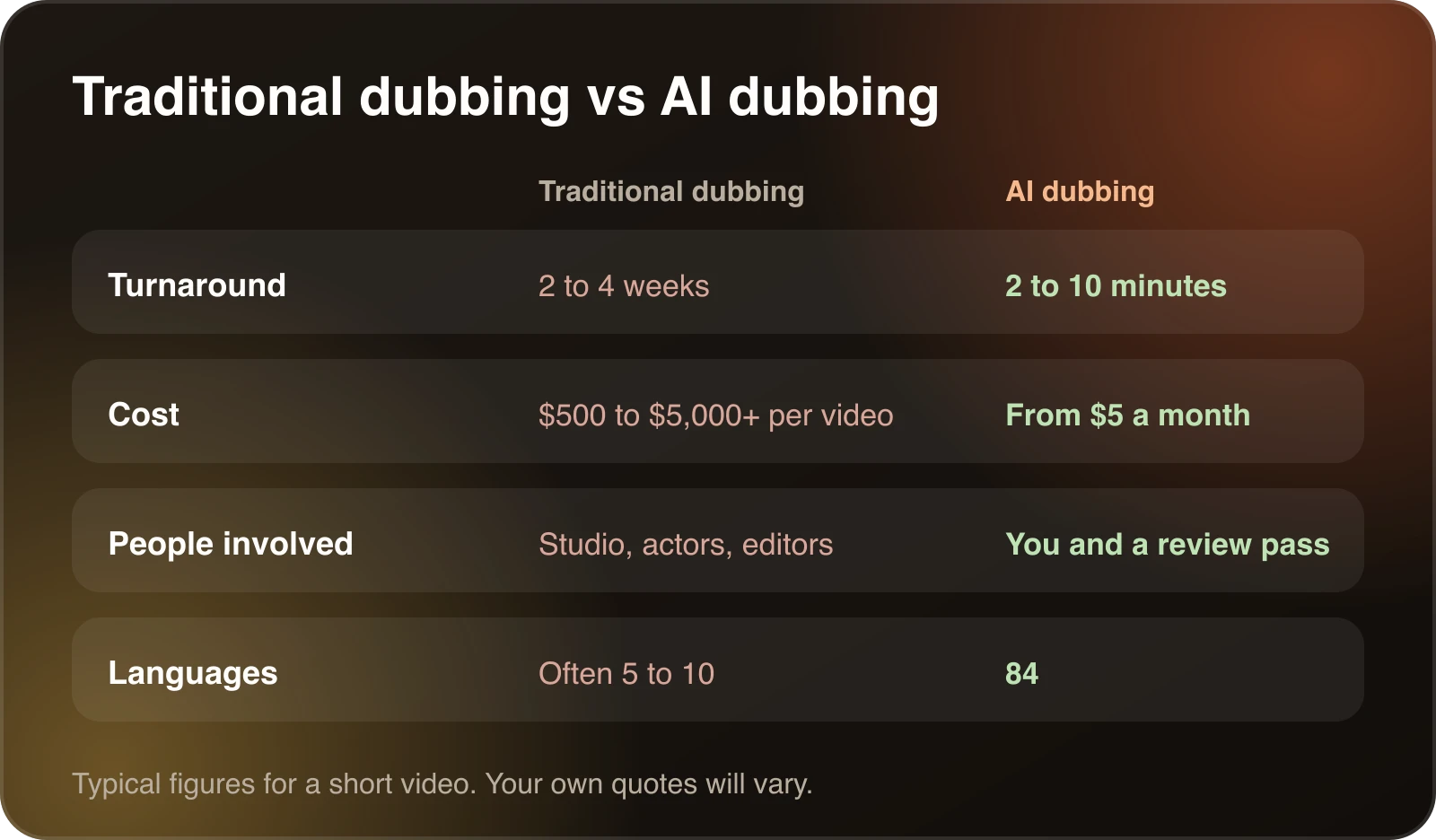
**It is fast.** Most videos finish in 2 to 10 minutes. You can dub on your upload day instead of planning a separate localization project.
**It keeps your voice.** Voice cloning carries your voice, tone and pacing into each language, so the channel still sounds like you. [How to preserve a speaker's voice](/guides/how-to-preserve-a-speakers-voice-when-translating-video/) explains how to get a clean result.
**It lets you fix lines before you publish.** In Studio you edit any line of the translated transcript and regenerate only the segment you changed.
## How AI dubbing works
An AI dubbing tool does four things in order. It transcribes the speech, translates the text, generates speech in the new language, and gives you a chance to review. The guide to [how AI video translators work](/guides/how-ai-video-translators-work/) walks through each stage and where it can go wrong. The short version is that the transcript decides the quality of everything after it, and the review step decides whether the result is fit to publish.
Typical differences for a short video. The cost guide has the full breakdown.
## How to auto dub a YouTube video
1. **Upload or paste a link.** Upload an MP4, MOV, AVI or MKV file, or import the video from YouTube, Vimeo and other platforms.
2. **Pick your languages.** Choose from 84 languages. Dubtitle transcribes, translates and dubs each one.
3. **Review and download.** Check the translation in Studio, fix any line you do not like, then download the dubbed video.
For a full worked example, read [how to dub a YouTube video into Hindi](/guides/how-to-dub-a-youtube-video-into-hindi/). The steps are the same for any language. Publishing options, such as a separate channel or an extra audio track, are covered in [how to translate a YouTube video](/guides/how-to-translate-a-youtube-video/).
## YouTube's automatic dubbing and a dubbing tool
YouTube offers its own automatic dubbing on some channels. It is convenient when you have it. A dedicated tool gives you more control over the result. You choose the languages, edit the translation before publishing and use glossaries so names and terms are translated the same way every time. It also works on any video you have the rights to dub, whether or not your channel has YouTube's feature.
## What to check before you publish
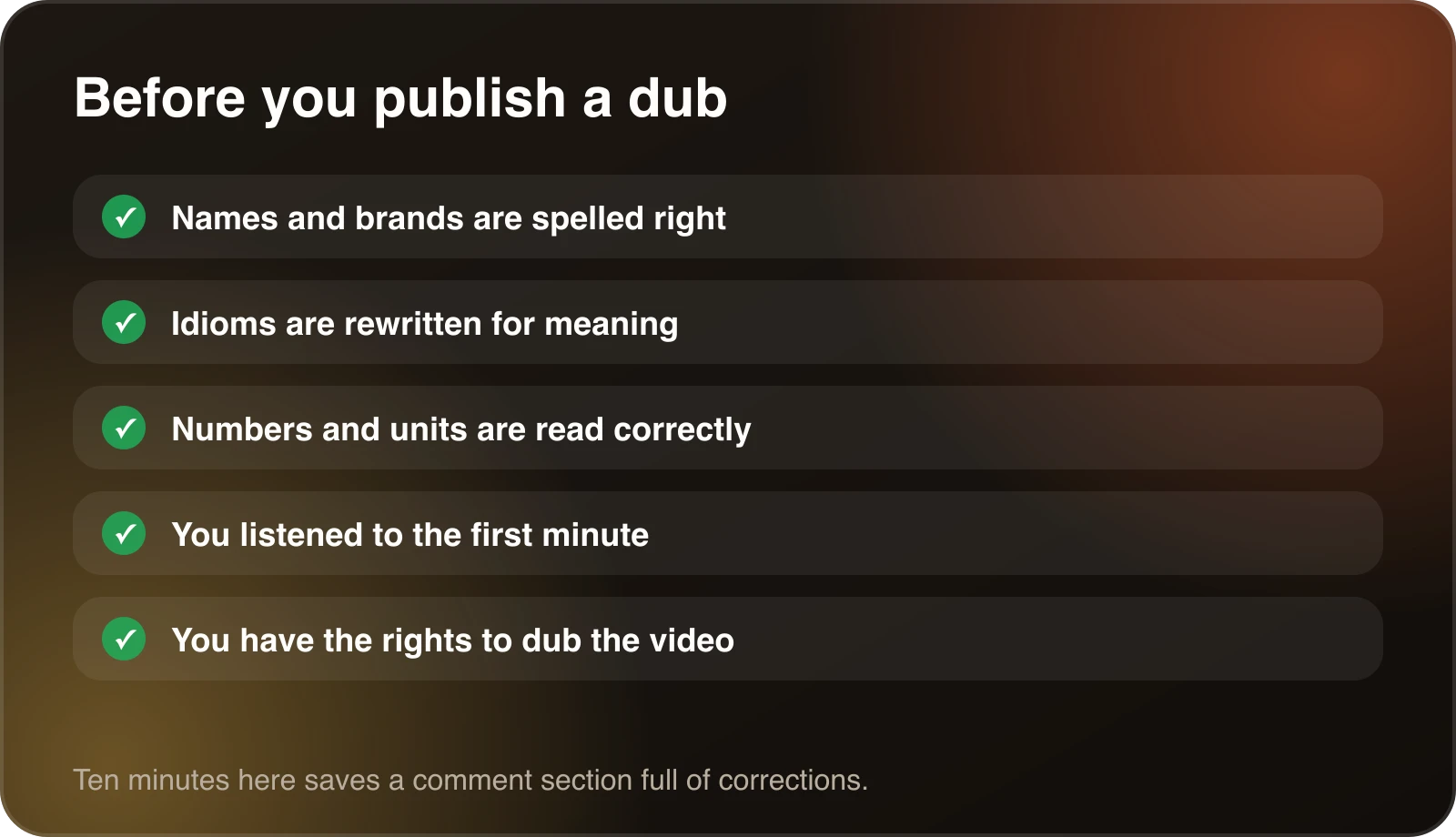
- **Names and brands.** Make sure they are spelled the way you want and not translated.
- **Idioms.** A literal translation of an expression reads as nonsense. Rewrite the meaning.
- **Numbers and units.** Check that figures are written and spoken the way your audience expects.
- **The first minute.** Listen to it. That is where viewers decide whether to keep watching.
- **Rights.** Only dub videos you own or have permission to translate.
Recurring terms are easier to fix once than line by line. A [translation glossary](/resources/ai-dubbing-glossary/) does that, and glossaries come with the Creator plan and above.
Five checks to run before a dub goes live.
## AI dubbing or subtitles
Subtitles keep your voice and add text. They are cheaper and work for every video. A dub suits tutorials, courses and channel videos, where viewers should look at the screen instead of reading. Most channels end up using both. [AI dubbing vs. subtitles](/guides/ai-dubbing-vs-subtitles/) goes through how to choose, and [how to create an SRT file](/guides/how-to-create-an-srt-file/) covers the subtitle side.
## Who uses AI dubbing
Creators use it to grow channels in new markets. One YouTube creator dubs well known informative videos into Hindi so people in India can learn from them. An Udemy instructor uses it so students from different countries can [follow courses in their own languages](/guides/how-to-localize-online-courses-for-international-students/). Teams use it for training and product videos. The common thread is a library of videos that already works in one language and an audience that would watch it in another.
## Common mistakes with YouTube dubs
- **Publishing without reading the transcript.** A single wrong product name in the first minute is the one viewers remember.
- **Dubbing everything at once.** Start with one video and one language, and check watch time before you scale up.
- **Leaving the title and thumbnail in English.** A dubbed video with an English title is hard for new viewers to find. Translate the title, description and thumbnail text the way people in that language search.
- **Replacing the original.** Keep your original video and add the dub next to it.
- **Ignoring length.** Some languages run longer than English, so a dub may need tighter wording to fit the same scenes. The [speaking time calculator](/tools/speaking-time-calculator/) gives a rough idea of how long a script takes to say.
## Choosing your first language
Look at your analytics before you pick. YouTube Studio shows which countries watch you and in which languages. If a country already watches you in English, a dub in its language is likely to do well. Spanish, Hindi, Portuguese and French are common first choices because they reach large audiences. Our notes on [translating a video to Spanish](/guides/how-to-translate-a-video-to-spanish/) and [translating a video to English](/guides/how-to-translate-a-video-to-english/) cover what is specific to those languages.
## What it costs
Plans start at $5 a month, with a 7-day free trial. Traditional studio dubbing is commonly quoted at $500 to $5,000 or more per video and takes two to four weeks. See [pricing](/pricing/) for every plan and [how much video dubbing costs](/guides/how-much-does-video-dubbing-cost/) for how to estimate a budget. Every paid plan has a 30-day money-back guarantee.
## Frequently confused terms
**Dubbing** replaces the original speech with speech in another language. **Voiceover** lays a translated voice over the original audio, which usually stays faintly audible underneath. **Subtitles** add translated text and leave the audio alone. **Voice cloning** generates speech in a voice modelled on a specific person. People use these words loosely, so check which one a tool means before you compare prices. The [AI dubbing glossary](/resources/ai-dubbing-glossary/) defines these and other terms.
## A simple way to start
Pick one video that already does well. Dub it into one language your analytics suggest. Read the transcript, fix names and idioms, and translate the title and description. Publish it, wait two weeks and compare watch time. If it works, dub the next five. If you are comparing tools first, [best AI video dubbing software](/guides/best-ai-video-dubbing-software/) shows what to look for.
## Frequently asked questions
### What is AI dubbing?
AI dubbing transcribes the speech in a video, translates it, and generates a spoken track in the new language, usually in a voice close to the original speaker's. See AI dubbing vs. subtitles to decide when a dub is worth it.
### Can I auto dub a YouTube video?
Yes. Paste the video link or upload the file, choose your languages, and Dubtitle dubs it automatically. YouTube also offers its own automatic dubbing on some channels. Dubtitle works on any video you have the rights to dub, and you can edit the translation first.
### How long does it take to dub a video?
Most videos are processed within 2 to 10 minutes, depending on length and complexity.
### What languages do you support?
Dubtitle supports 84 languages, including Spanish, French, German, Italian, Portuguese, Hindi, Japanese, Korean, Chinese and Arabic.
### Can I use my own voice for dubbing?
Yes. You can clone your own voice and use it for dubbing in different languages. Clean source audio gives a better result.
### How much does AI dubbing cost?
Plans start at $5 a month. See pricing for every plan, or read how much video dubbing costs for the comparison with traditional dubbing.
### Can I try it before buying?
Yes. Start with the 7-day free trial, and every paid plan is backed by a 30-day money-back guarantee.